Upload a folder
Copy a whole folder to a server. AirSCP sends each folder as one stream, which is much faster than file by file.
Steps
- Drag the folder onto the server pane (or select it and click Upload).
- AirSCP asks before it copies: Upload 1 folder to “…”?
- Optional: type names or patterns in Leave out, separated by commas, for example
*.log, node_modules, .git. They stay behind wherever they are in the folder. AirSCP remembers this for the server. - Optional: tick Compress during transfer. It is faster on slow connections and for many small files, slower on fast ones.
- Click Upload.
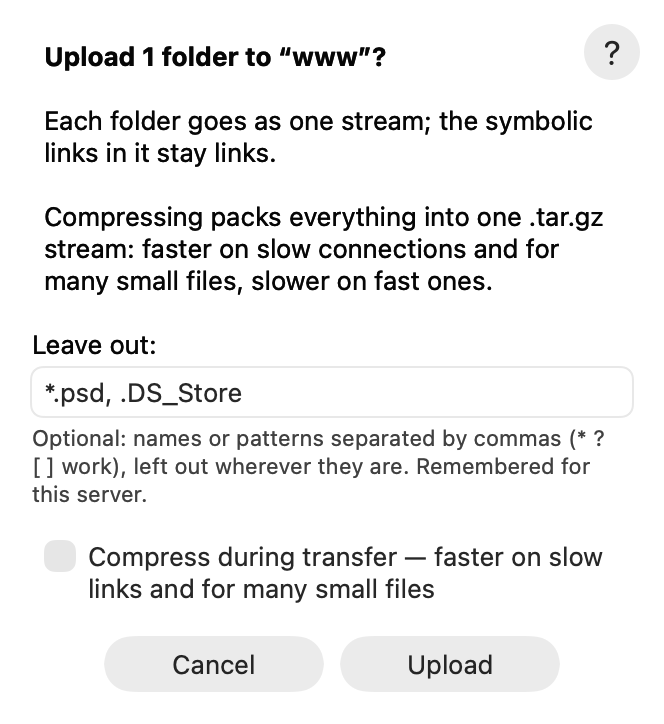
Downloading a folder works the same way, with the same sheet.
Tips
*,?and[ ]work in Leave out:*.psdleaves out every Photoshop file.- 200 or more loose files at once get the same sheet, and go as one stream too.
- Symbolic links stay links.
- The ? button in the sheet opens this page.
If something goes wrong
- “This server can’t send folders as one stream”: the server has no shell or no
tar(for example an account that allows file transfers only). AirSCP copies the folder whole with scp instead, and Leave out can only skip the items you picked. - Names that differ only in case (
READMEandreadme) can’t sit side by side on a Mac disk. AirSCP says so when you download such a folder.